What you can edit
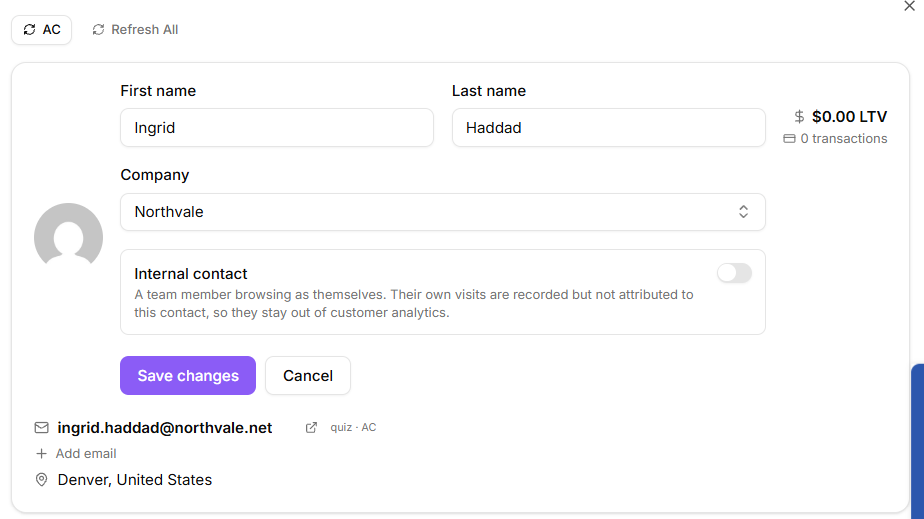
Open a contact from the contacts list and use the edit form on the record. You can change:
First name
Last name
Company
Select Save changes. KeyMetriq confirms with a "Contact updated" message. Cancel discards the draft.
Editing a contact
Picking a company
Company controls appear only when the Companies feature is switched on for your workspace. With it switched off, the contact record header shows no company row and the Company field above does not apply.
In the edit form, the company field is a search box over the companies in your workspace, so you do not have to remember exact spelling. If the contact's email address is on a company domain you already track, KeyMetriq suggests that company for you. Choosing No company leaves the contact unattached.
You can also change the company straight from the record header, without opening the edit form. When the contact already has one, the header shows the company name with a small pencil beside it. The pencil only appears while your pointer is over that row, so hover the row to reveal it. When the contact has no company yet, the header shows a Reassign company button in its place.
Adding an email address
A contact record shows a Primary email and any Secondary email addresses. Select Add email in the record header, type the address and save. KeyMetriq confirms with "Email added."
This is worth doing whenever you learn that a customer uses a second address. Every future import and form submission matches against all of a contact's addresses, so adding one now prevents a duplicate later.
If the address you enter already belongs to another contact, KeyMetriq stops and asks: Email already in use, and offers to merge this contact into the one that owns the address. Accepting merges the two records; declining leaves both alone.
Why the rest is read-only
Almost everything else on a contact record comes from a connected platform: transactions from your payment processor, list membership from your email platform, tickets from your help desk, website activity from your tracking snippet. KeyMetriq shows you what those systems reported.
That means the fix for a wrong value is usually in the source system. Correct it there, and the next sync brings the correction across. Editing it only in KeyMetriq would be overwritten on the following sync, so the app does not offer it.
Wrong person, not wrong value
If the problem is that one human has ended up as two records rather than one field being wrong, do not retype anything. Merge the records instead: on a contact record, Merge into this contact lets you search for the other record and pull all of its emails, transactions, tags and history across. Reassign company in the same header moves the contact to a different company without opening the edit form. See "Merging two contacts" in the Duplicates & Merging category.