Why a subdomain of your own
KeyMetriq asks you to pick a subdomain on your own site, for example m.acme.com, and point it at its tracking infrastructure. The widget then loads from your own domain, which makes it resistant to ad blockers by default and keeps every visitor first-party.
Go to Settings, then the tracking section, and find Connect website.
Step 1: pick a subdomain
Enter the subdomain you want to use, for example m.acme.com, and save.
Choosing a tracking subdomain
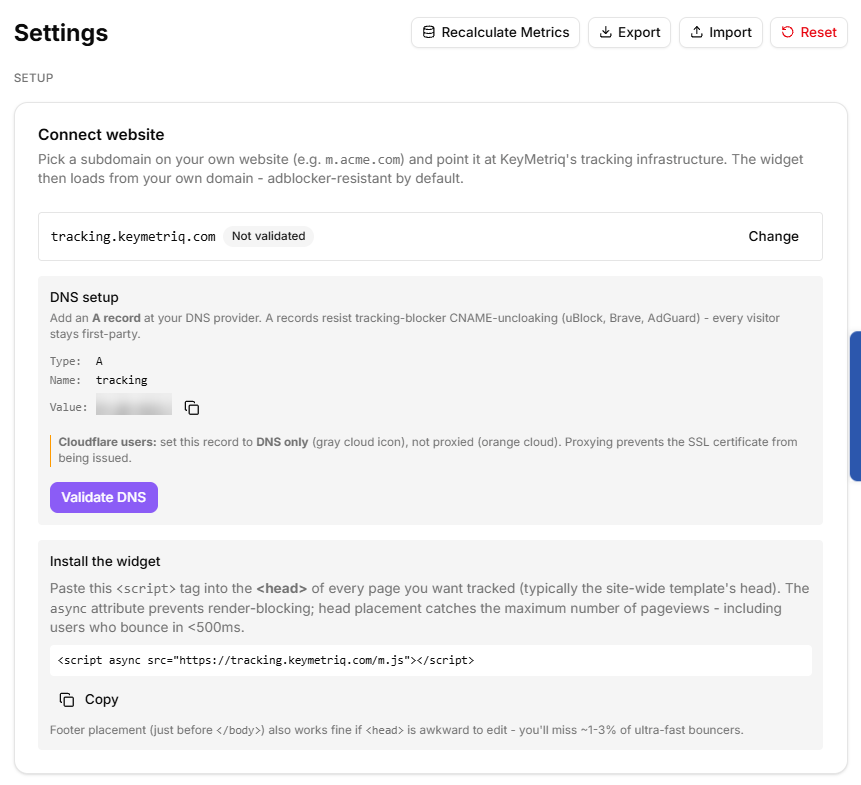
Step 2: add the DNS record
Add an A record at your DNS provider with the name and value shown on the card. KeyMetriq uses an A record rather than a CNAME on purpose: tracking blockers such as uBlock, Brave and AdGuard uncloak CNAMEs, and an A record resists that.
If your DNS is on Cloudflare, set this record to DNS only, the grey cloud, not proxied. Proxying prevents the SSL certificate from being issued and the setup will never complete.
Select Validate DNS, or Re-check DNS afterwards. The badge tells you exactly where you are:
Connected
No DNS record
Wrong target, which names what your record currently points at and what it should point at
DNS lookup failed
Not validated
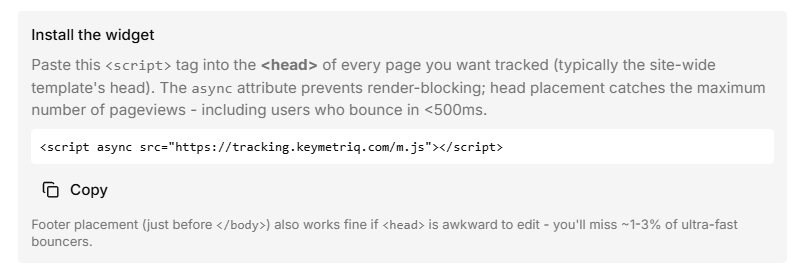
Step 3: paste the snippet
Copy the script tag and paste it into the <head> of every page you want tracked, which normally means your site-wide template.
Head placement catches the most pageviews, including visitors who leave in under half a second. The tag is loaded asynchronously so it does not block rendering. Placing it just before </body> also works if the head is awkward to edit; you lose roughly 1 to 3 percent of very fast bounces.
The tracking snippet
Step 4: confirm it works
Go to Tracked domains in the same settings area and add the domains you own, and any short-link hosts you use. Use *.example.com to match all subdomains.
Each tracked domain shows its own activity:
Never seen means no tracking events have arrived from that domain, so the widget is not installed or not running.
Last seen, with a count of pageviews in the last 30 days, means it is working.
Load a page on your site, wait a moment, and check that the domain moves off Never seen.
Privacy settings
The Privacy & attribution section decides how the widget treats Do Not Track and Global Privacy Control signals:
Respect (recommended): those visitors are tracked anonymously, with no contact attribution, no IP hash and no device telemetry.
Flag only: captured as normal but marked, with the regulatory responsibility on you.
Off: signals ignored entirely.
Leave it on Respect unless you have a specific reason and advice to do otherwise.