There is no generic contacts importer
KeyMetriq does not have a "upload any contacts CSV" screen. File imports are per platform, and each one is a wizard that knows the exact shape of that platform's export:
ActiveCampaign import: your full ActiveCampaign export, as CSV.
SamCart import: your SamCart charges, orders, failed charges and refunds exports, as CSV.
Mighty Networks import: your Mighty Networks members export, as XLSX.
This is deliberate. A generic importer would need you to map every column by hand and would still guess wrong about what a row means. A platform-specific wizard already knows which column is the email address, which is a tag, and which is a transaction.
What every file import has in common
All three wizards follow the same shape.
Choose the file. Drop it on the page or click to browse. The wizard checks the headers immediately and tells you whether it is a valid export before you go any further.
Preview. You see what was found before anything is written: how many rows matched existing contacts, how many would be new, and a sample of the tags or plans in the file.
Decide whether to create contacts. Every wizard has a toggle for this. Leave it off and only people already in KeyMetriq are enriched; anyone in the file without a matching email address is skipped. Turn it on and new contacts are created for them.
Import. A progress bar and an elapsed timer run while it works.
Summary. Counts of what happened: matched, created, skipped, tags added.
Reviewing an import before it runs
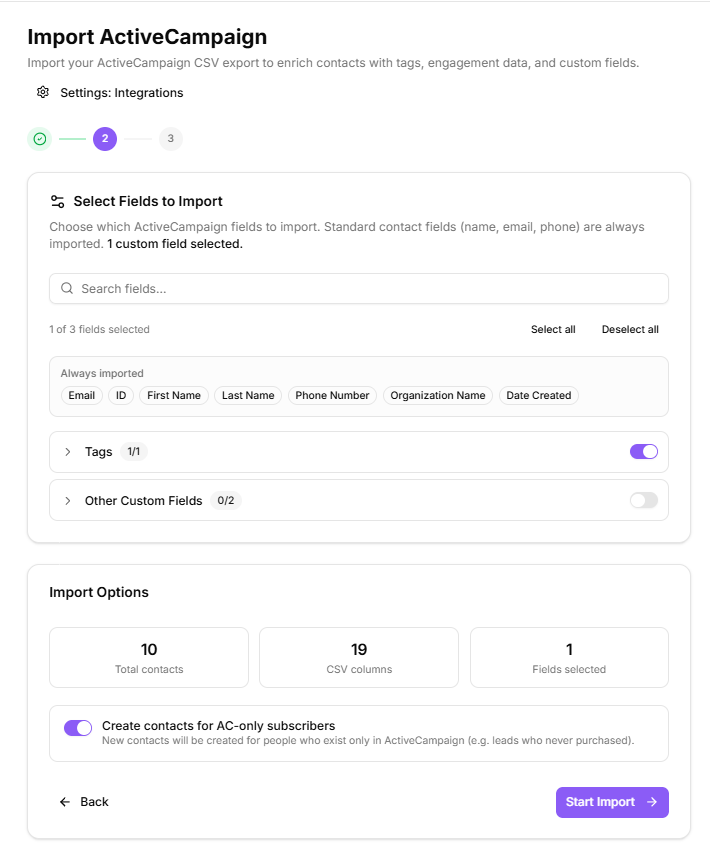
Matching is by email address
Every file import matches on email address, exactly as platform syncs do. A row whose email address already belongs to a contact enriches that contact. A row with no email address cannot match anything.
So before you import anything, check that your export includes an email column and that it is populated. That single check prevents most import problems.
After the import
Open Duplicates and run a scan. A large import is the most likely moment for near-duplicate records to appear, and the queue is much easier to judge while the import is fresh in your mind.